Feedback and Support
Let's face it we all have great ideas, but sometimes there are so many great ideas, we need more than one person to provide input on it. That's why we ask you to discuss your ideas and vote!
Feedback on the training material
Whenever you find an article unclear or simply feel like something is missing from the training material, use a button below each article to tell us about it. Also, feel free to drop us a line at [email protected] with more detailed comments! And we don't need to tell, that your applause is more than welcome :)
Feedback on the TolaData application
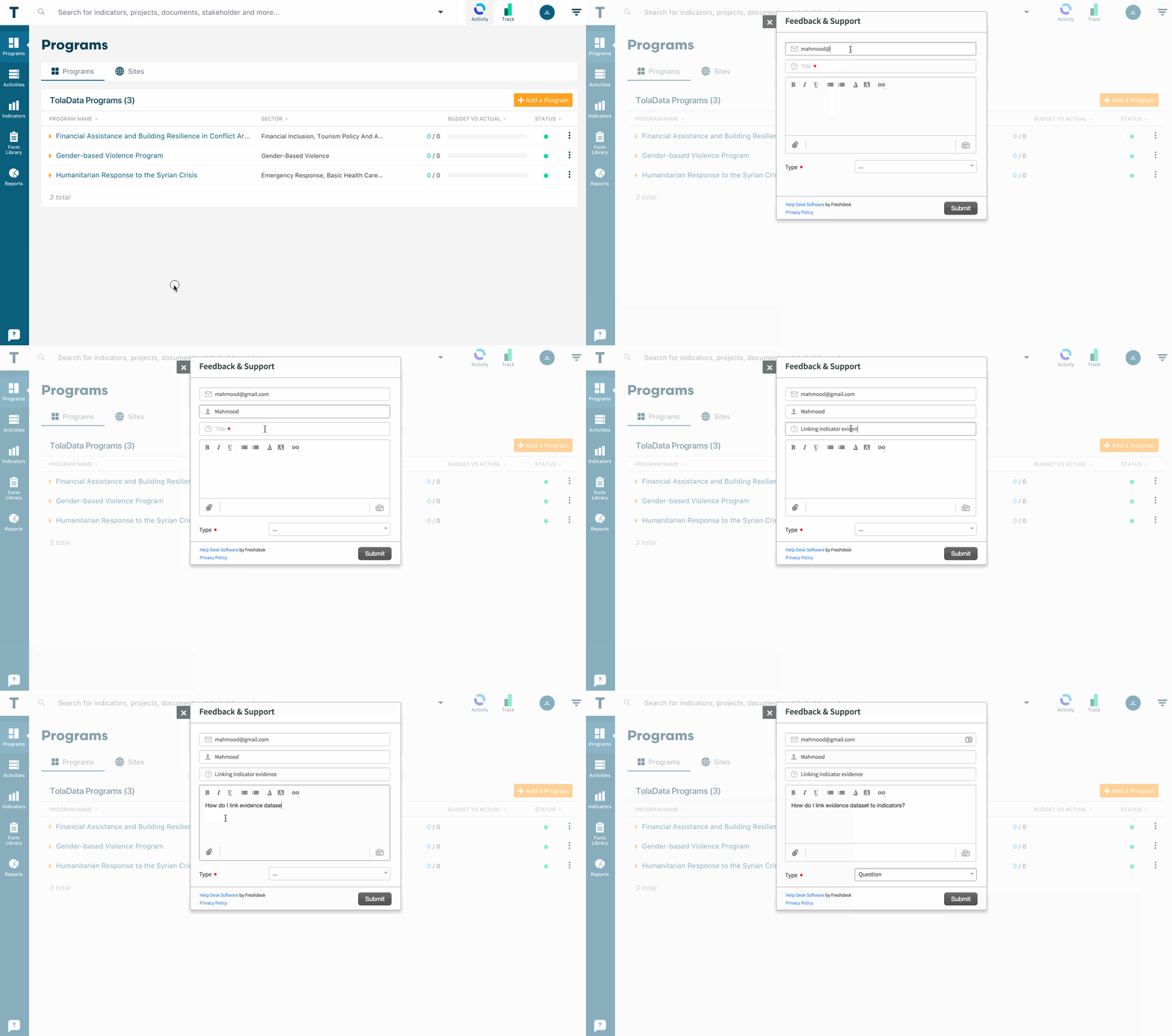
Here's how to share your requests or add a ticket on TolaData:
What is a ticket?
A ticket could be a report on a specific issue or a problem you are having using the software, or it could be you have a request for an enhancement to the software. All the tickets are reviewed, tagged, and prioritized by the TolaData team.
How best to enter a ticket
When entering tickets there are basic questions you can answer, to help us understand the issues described in the ticket.
What browser are you using?
What, if any, error message did you get?
What did you expect to happen?
What actually happened?
An example of a ticket lacking the details we need is,
" I found an error when I was working in TolaData."
The problem with this kind of ticket is, it's hard for us to know where to start troubleshooting without contacting you for more information.
An example of a good ticket is:
"When I click the submit button on the new Indicator page for Program XYZ, I get this error....
I have pasted below the error message and the page URL where I found the error."
With that amount of detail in a ticket, we are able to start working on a solution right away. You can also attach a screenshot of the page where you found the error in.
When submitting a ticket, focus on describing the business problem and try to prioritize your request. Our developers will do the rest and come up with a solution!
Three types of tickets you can submit
The types help us prioritize the work queue.
Problems
Choose problem when you are requesting help with something you are having an issue with, but you can still get your task done.
Errors/Bugs
Choose Error/Bugs if you receive an error or if there is unexpected behavior, especially when you cannot finish your task!
Enhancements
Anything you or your colleague would like to see added or changed, but is not broken!
Our work queue
The TolaData team monitors the tickets daily. Problems, such as bugs in the software, are usually fixed in the next release of our software.
We will be directly in touch with you with questions regarding your ticket. Requests for enhancements to the software require more feedback from other TolaData users before we can assign our software developers to the ticket.